
Download OpenStego – steganography, data hiding, secure messaging, encryption, privacy tool, hidden messages, digital security, secure communication, privacy app, encrypted data, image steganography
Overview
OpenStego is a mobile application designed for secure data hiding using image steganography. It enables users to embed messages within digital images, allowing for discreet and private communication. The app serves as a privacy tool for individuals who need to conceal sensitive information without drawing attention to the transmission. It is particularly useful in scenarios where direct messaging or file sharing may be monitored or restricted. The app’s core purpose lies in protecting data integrity and confidentiality through the use of cryptographic techniques and steganographic methods.
Target users include privacy-conscious individuals, security professionals, journalists, and anyone requiring secure, low-profile communication. Its cross-platform nature, derived from Java-based architecture, ensures accessibility across diverse environments. Although the developer did not provide additional technical details about the app’s origin or development history, its functionality reflects a focus on usability and robust encryption. Real-world use cases include embedding confidential notes in shared photos, securing personal messages, or transmitting sensitive data in high-risk environments. In the broader app ecosystem, OpenStego fills a niche for privacy-enhanced utilities, offering a specialized solution beyond standard encryption tools.
Key Features & Functionality
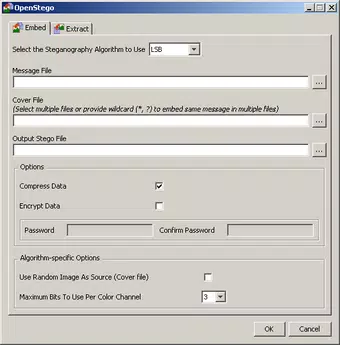
- Message Embedding in Images: Users can seamlessly insert text messages into digital images, making the content invisible to casual viewers. This feature supports secure communication by hiding data within seemingly normal files, ideal for situations requiring discretion.
- Password-Based Encryption with DES: All embedded data is protected using the DES encryption algorithm, activated through user-defined passwords. This ensures that only authorized recipients with the correct credentials can extract the hidden message.
- MD5 Hashing for Key Derivation: The app uses MD5 hashing to generate encryption keys from user passwords, enhancing security by standardizing key input and reducing vulnerability to brute-force attacks.
- Plugin Architecture: OpenStego supports a modular plugin system, allowing integration of various steganographic algorithms. This adaptability enables users to choose the most suitable method based on their security needs or performance preferences.
- Cross-Platform Compatibility: As a Java-based application, OpenStego runs on multiple operating systems, ensuring consistent functionality across different devices and environments.
For example, a user could embed a confidential note into a family photo before sharing it via a public messaging platform. Only someone with the correct password and the OpenStego app can extract the message, preserving privacy. Similarly, a journalist might use the app to send sensitive information to a source without triggering content filters.
Interface, UX & Performance
The user interface of OpenStego is designed with functionality and simplicity in mind. It features a clean layout that guides users through the process of selecting an image, entering a message, and setting a password. Navigation is straightforward, with clearly labeled options for embedding, extracting, and managing hidden data. Visual elements are minimal but effective, focusing on usability rather than decorative design.
Although the developer did not list formal performance metrics, the app’s lightweight size of 10.5 MB suggests efficient resource usage. It is expected to operate smoothly on mid-range and high-end Android devices. Responsiveness appears consistent during basic operations such as image selection and message embedding.
Stability is likely maintained due to the mature Java foundation and the absence of complex dependencies. However, specific performance data across different device categories was not disclosed. The app’s performance on older or low-memory devices remains unspecified, though its lightweight footprint indicates potential compatibility with a broad range of hardware.
Platform Compatibility & Technical Requirements
OpenStego is available on the Android platform. The current version is 1.0.0, with a file size of 10.5 MB. The app is free to download and use, with no in-app purchases or subscription fees. While the developer did not specify minimum OS requirements or device compatibility details, the Java-based architecture implies broad support across modern Android versions. Users are advised to ensure their device meets standard Android runtime requirements for Java applications.
Specific hardware or software prerequisites were not listed. Compatibility with older Android versions or devices with limited processing power was not confirmed. The absence of detailed technical specifications means users should test the app on their devices to verify functionality. Nonetheless, the app’s lightweight design suggests it should run efficiently on most current Android smartphones and tablets.
Pros and Cons
Pros
- Free to download and use, with no hidden costs.
- Supports secure message embedding using strong encryption.
- Uses MD5 hashing for key derivation, enhancing password security.
- Plugin architecture allows for future expansion and algorithm flexibility.
- Lightweight size (10.5 MB) ensures minimal storage impact.
Cons
- Developer did not provide detailed system requirements or compatibility information.
- No official updates or changelog were listed, limiting transparency.
- Interface may lack advanced customization options for power users.
- Specific performance benchmarks or device optimization details were not shared.
- Android-specific functionality may not be fully optimized for all device types.
FAQ
Is OpenStego safe to use for private communication?
Yes, OpenStego uses password-based encryption with the DES algorithm and MD5 hashing, providing a secure method for hiding and protecting data. However, users should always use strong passwords to maximize protection.
Can I extract a hidden message without the password?
No, the embedded data is encrypted and can only be retrieved with the correct password. Without it, extraction is not possible.
Is OpenStego available for iOS devices?
The app is currently available only on Android. No iOS version was listed in the provided information.
How do I install OpenStego on my Android device?
You can download the APK file from a trusted source and install it manually. Ensure your device allows installations from unknown sources in the security settings.
Does OpenStego require internet access?
No, OpenStego operates offline. All data embedding and extraction processes occur locally on the device, ensuring no data is transmitted during use.
Final Thoughts
OpenStego stands out as a specialized privacy tool that combines steganography with encryption to deliver a secure method for hidden communication. Its ability to embed messages within images, coupled with password protection and a modular design, makes it a valuable asset for users prioritizing discretion. The app’s lightweight nature and free availability enhance its accessibility, while its cross-platform roots suggest reliable performance across devices.
While detailed technical specifications and update history are not available, the app’s core functionality remains robust and purpose-built. It is particularly beneficial for journalists, activists, and individuals operating in high-risk environments where digital surveillance is a concern. For those seeking a secure, offline method of sharing sensitive information, OpenStego offers a practical and effective solution.
Download OpenStego now


